
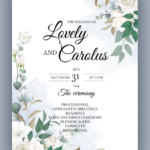
The All Invitation Card Maker App provides tools for users to design a wide range of digital invitation cards for various occasions. It enables the creation of invitations for events such as birthdays, engagements, weddings, parties, and baby showers. Users can personalize their cards by selecting from over 1000 ready-made templates, incorporating their own photos, and modifying text elements like names, dates, and venues. Once completed, invitations can be shared directly or saved as a PDF for printing.
Template Categories and Selection
The app offers a comprehensive selection of over 1000 pre-designed templates tailored for various special occasions. Users can browse categories specifically for weddings, engagements, birthdays, and general parties. Additionally, the app includes specialized options such as a Shadi Card Maker for Indian and traditional weddings, Christmas invitation cards, and Save The Date designs. The availability extends to custom greeting cards and flyers, allowing users to find a suitable starting point for almost any event.
Personalized Card Design
Once a template is chosen, the app provides tools for extensive personalization. Users can easily edit text fields to add essential details like names, the event venue, specific dates, and RSVP information. A range of fonts and colors are available to match the card’s aesthetic to the event’s theme. For a more personal touch, the app supports photo and background customization, enabling users to upload their own images or select from various backgrounds. Decorative elements such as stickers and emojis can also be added to enhance the invitation’s visual appeal.
Invitation Creation Workflow
Creating an invitation with the app follows a straightforward, documented process. Users begin by opening the app and then selecting an event category, such as wedding, birthday, or engagement. Next, a preferred template is chosen from the available designs. The customization phase involves adding and editing text, selecting fonts and colors, and incorporating stickers. Finally, users input specific event details like names, the venue, and the date before proceeding to save or share their completed invitation.
Output and Sharing Capabilities
Upon finalizing their invitation card, users have two primary options for distribution. They can share the digital invitation directly with friends and family through various platforms. Alternatively, the app supports saving the finished card as a PDF file, which can then be used for printing physical copies. This flexibility allows users to choose the most suitable method for their event’s needs.







Write a review